Vidu Q3 is a video generation model developed by ShengShu Technology. In StoReel Canvas it is available as Vidu Q3 Turbo and Vidu Q3 Pro, two separate models. Use them for scenes built from references: a character, a location and a prop that must look the same in the shot.
StoReel Canvas TeamReviewed by StoReel Canvas Product TeamUpdated
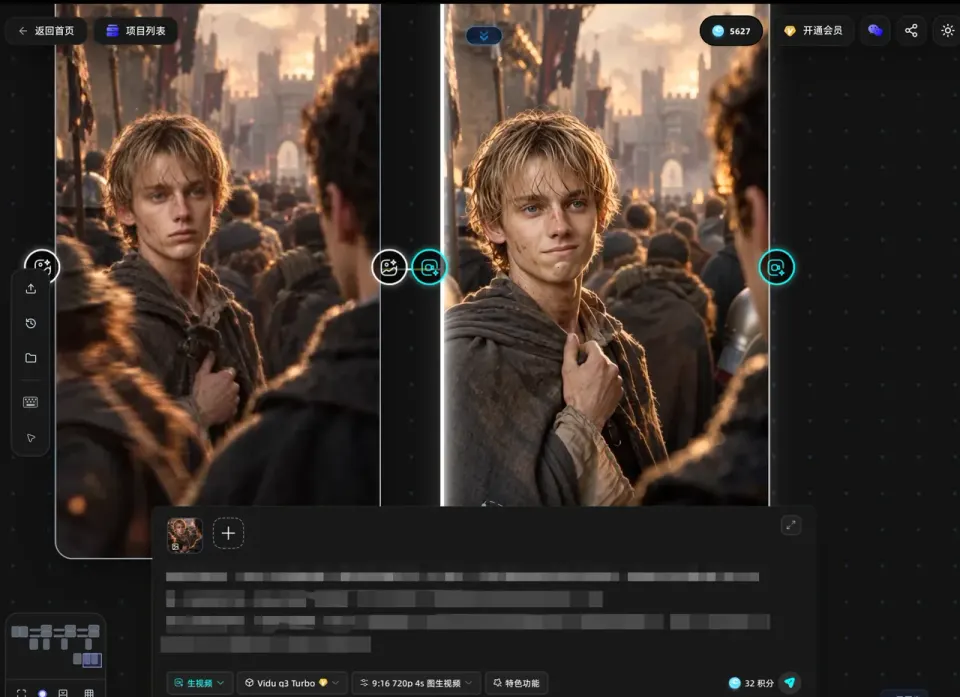
Three references from the asset step, and the Vidu Q3 frame that uses them.
What is Vidu Q3?
Vidu Q3 is a video generation model from ShengShu Technology. The developer's press release is dated 13 April 2026 and presents it as a reference-to-video release.
StoReel Canvas is an AI-native creation platform for AI short dramas, covering script, storyboard, voiceover and video generation in one workflow. This page explains where Vidu Q3 fits in that workflow. It is not the developer's page. The press release is linked under Learn more, and it is the place to check model specifications.
What does Vidu Q3 do, according to the developer?
These are statements from ShengShu Technology's press release of 13 April 2026, not a list of StoReel Canvas features. Check the options shown for each model in your project to see what you can use there.
Reference-to-video: the developer states that creators can combine subjects, environments, costumes, props and visual styles in one workflow.
Up to 16 seconds of video with synchronized audio and visuals.
Five sound categories: ambient sound, motion-driven audio, atmospheric layers, foley effects and emotion-driven cues.
Six cinematic effect types: particle systems, fluid simulation, dynamic motion, camera movement, transitions and lighting.
The press release does not state a resolution, so this page does not give one.
When should I use Vidu Q3 for a scene?
Use it when a shot has to combine specific things you already defined: a character, a place and a prop. That is the case reference-to-video is built for, and it pairs with the asset step in StoReel Canvas, where you set up characters, locations and props before you generate. If you want the same person to appear in every scene, start with how to keep the same character across scenes.
Here is a repeatable test:
Set up one character, one location and one prop in the asset step, for example a woman, a night market and a paper lantern.
Pick an approved storyboard panel that needs all three in the same shot.
Generate it with Vidu Q3 Turbo and again with Vidu Q3 Pro, using the same references and prompt.
Check each clip against the references: is the character recognisable, is the location right, does the prop appear and stay consistent?
If the answer is no for a scene, change the references or the prompt, or try another model. Nothing here ranks one model above another.
How do I use Vidu Q3 inside StoReel Canvas?
You choose a Vidu Q3 model for a scene after the script, storyboard and assets are in place. The workflow runs in this order:
Break the story into panels with the AI storyboard generator and approve them, so each scene has a fixed shot to follow.
Set up your characters, locations and props in the asset step.
Choose Vidu Q3 Turbo or Vidu Q3 Pro for the scene and generate it.
Review the clip against its storyboard panel and references, adjust, and generate again if the scene does not match.
Each scene can use a different model, so a project does not have to commit to Vidu Q3 from start to finish. The full process, from idea to finished episode, is covered on the AI short drama generator page.
Which Vidu Q3 models are in StoReel Canvas?
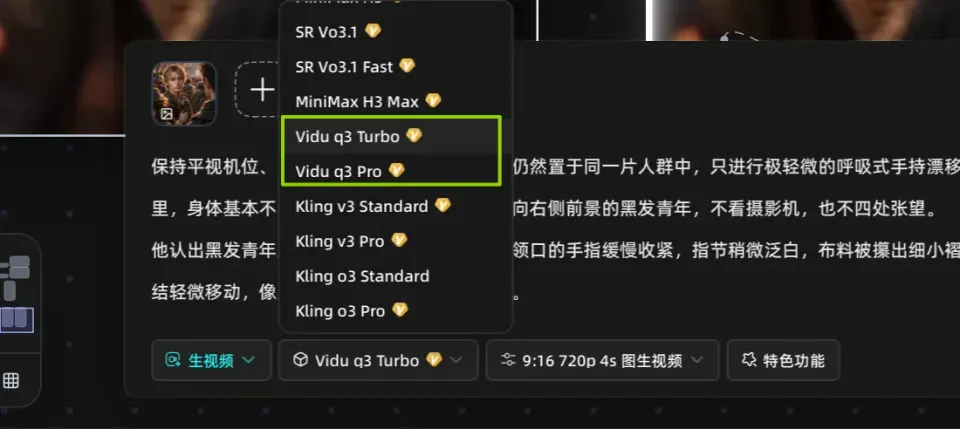
StoReel Canvas offers two Vidu Q3 models: Vidu Q3 Turbo and Vidu Q3 Pro. Each is a separate model. Turbo and Pro are names of separate models, not quality levels or price levels, and neither is better or cheaper than the other by name alone.
Vidu Q3 Turbo and Vidu Q3 Pro appear as separate models in the model selector.
Which Vidu Q3 models are in StoReel Canvas?
Model
In StoReel Canvas
Vidu Q3 Turbo
Available in StoReel Canvas as a separate Vidu Q3 model
Vidu Q3 Pro
Available in StoReel Canvas as a separate Vidu Q3 model
Vidu Q3 or another model?
Choose by what the scene needs. If a scene does not depend on references, run the same storyboard panel through MiniMax H3 or Seedance 2.0 and compare the clips. To see every option, browse the video and image models in StoReel Canvas.
Learn more
Check model specifications on the developer's release:
Vidu Q3 is a video generation model developed by ShengShu Technology. The developer's press release of 13 April 2026 presents it as a reference-to-video release with synchronized audio and visuals. In StoReel Canvas you can use Vidu Q3 Turbo or Vidu Q3 Pro to generate scenes for an AI short drama from your storyboard.
What are Vidu Q3 Turbo and Pro in StoReel Canvas?
Vidu Q3 Turbo and Vidu Q3 Pro are two separate Vidu Q3 models that you can choose for each scene. The names identify different models, not quality or price levels. Generate the same storyboard panel with both and compare the results before you choose one for a scene.
Can I use references with Vidu Q3?
The developer states that Vidu Q3 can combine subjects, environments, costumes, props and visual styles as references. StoReel Canvas has an asset step for characters, locations and props, so set those up before you generate. Check the options for the model you select, and review every clip against your references, because consistency is not guaranteed.
How do I use Vidu Q3 in a project?
Write your script, build the storyboard, set up your characters, locations and props, then choose Vidu Q3 Turbo or Vidu Q3 Pro for the scene and generate it. Review the clip against its storyboard panel, then adjust and generate again if it does not match. You need a StoReel Canvas account to start, and sign-in uses email or Google.
Where is the official Vidu Q3 information?
ShengShu Technology issued the Vidu Q3 press release dated 13 April 2026, carried by TechNode and linked in the Learn more section of this page. StoReel Canvas does not publish the developer's documentation, so use that source for model specifications.
Start your next scene
Pick Vidu Q3 Turbo or Vidu Q3 Pro for the scene that needs your references, and keep the rest of your AI short drama in one project.