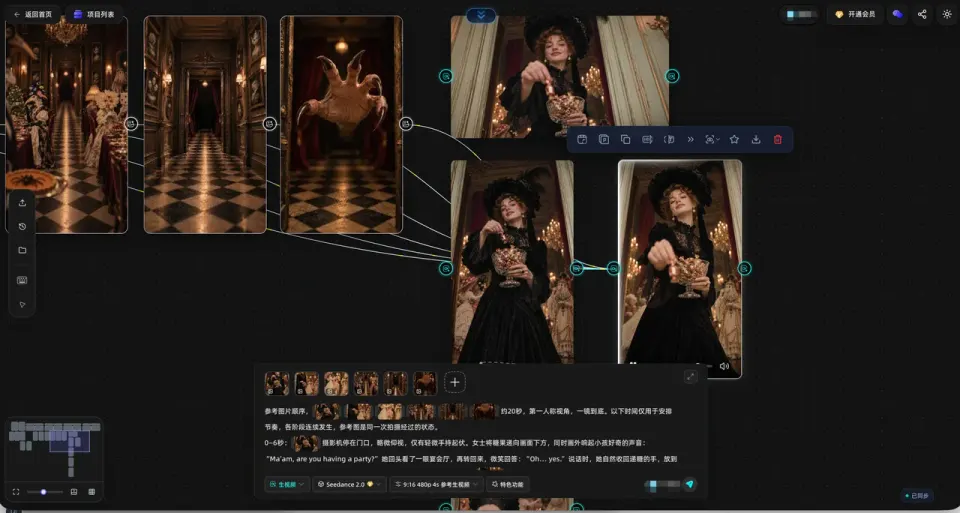
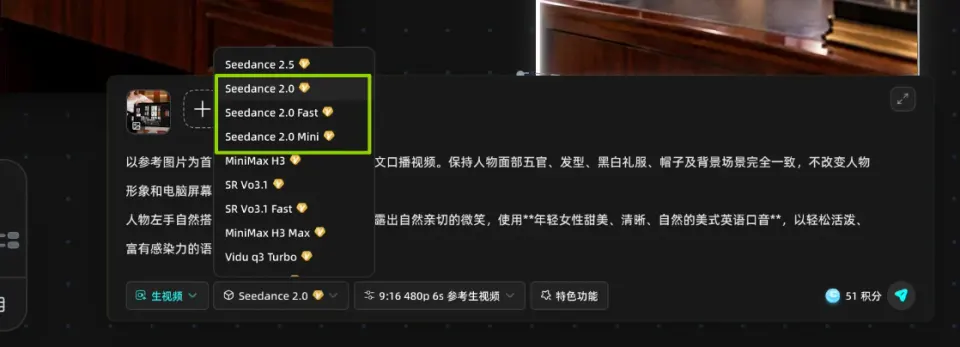
Seedance 2.0 is a video generation model developed by ByteDance. In StoReel Canvas it is available as Seedance 2.0 VIP, Seedance 2.0 Fast and Seedance 2.0 Mini, three separate models you can choose for each scene of your AI short drama.
StoReel Canvas TeamReviewed by StoReel Canvas Product TeamUpdated
A Seedance 2.0 scene generated from a StoReel Canvas storyboard panel.
What is Seedance 2.0?
Seedance 2.0 is a video generation model from ByteDance Seed. The developer's launch post is dated 12 February 2026 and describes a model that generates audio and video together from text, image, audio or video input.
StoReel Canvas is an AI-native creation platform for AI short dramas, covering script, storyboard, voiceover and video generation in one workflow. This page explains how Seedance 2.0 fits into that workflow. It is not the developer's page. The official sources are linked under Learn more, and they are the place to check model specifications.
What does Seedance 2.0 do, according to the developer?
These are ByteDance's statements about the model itself, not a list of StoReel Canvas features. Check the options shown for each model in your project to see what you can use there.
The model generates audio and video together in one system.
It accepts text, image, audio and video input. Images, audio clips and video clips can serve as references for things like composition, camera movement and sound.
It produces output of up to 15 seconds with multiple shots and two-channel stereo audio.
It supports editing specified parts of a clip and extending a video with a continuing shot.
The developer also names its limits: detail stability, text rendering, consistency across several subjects and complex edits still need work, and audio can occasionally distort.
How do I use Seedance 2.0 inside StoReel Canvas?
You choose Seedance 2.0 as the model for a scene once the script and storyboard are in place. The workflow runs in this order:
Choose a Seedance 2.0 model for the scene and generate it.
Review the result against its storyboard panel, adjust the prompt or the model, and generate again if the scene does not match.
Each scene can use a different model, so a project does not have to commit to Seedance 2.0 from start to finish. The full process, from idea to finished episode, is covered on the AI short drama generator page.
Which Seedance 2.0 models are in StoReel Canvas?
StoReel Canvas offers three Seedance 2.0 models. VIP, Fast and Mini are names of separate models. They are not quality levels or price levels, and one is not better or cheaper than another by name alone.
Seedance 2.0 VIP, Fast and Mini appear as separate models in the model selector.
Which Seedance 2.0 models are in StoReel Canvas?
Model
In StoReel Canvas
Seedance 2.0 VIP
Available in StoReel Canvas as a separate Seedance 2.0 model
Seedance 2.0 Fast
Available in StoReel Canvas as a separate Seedance 2.0 model
Seedance 2.0 Mini
Available in StoReel Canvas as a separate Seedance 2.0 model
Seedance 2.0 or Seedance 2.5?
Neither model is ranked here. Both come from ByteDance and the developer describes them differently, so choose by what the scene needs. The table sets the developer's own descriptions side by side.
Seedance 2.0 or Seedance 2.5?
What the developer states
Seedance 2.0
Seedance 2.5
How it is described
A next-generation video creation model with joint audio and video generation
A next-generation audio and video generation model built for 30-second storytelling
Length of output
Up to 15 seconds, multi-shot
Up to 30 seconds in one generation, with the option to extend twice
Reference and editing
Image, audio and video references; editing of specified parts; video extension
More precise reading of reference videos; editing that responds to a wider range of audio and visual requests
Other stated capabilities
Two-channel stereo audio
White-model control and green-screen editing
If a scene needs more than 15 seconds in one generation, the developer's description of Seedance 2.5 points to 30. For shorter scenes the stated differences do not make either model the obvious pick, so run the same storyboard panel through each and compare the results. Durations available in StoReel Canvas can differ from the developer's figures, so check the options in your project. The Canvas-specific guide is on the Seedance 2.5 model page.
For a different family of video models, see how Kling 3.0 is described, or browse every video and image model in StoReel Canvas.
Learn more
Check model specifications on the developer's pages:
Seedance 2.0 is a video generation model developed by ByteDance, announced in a launch post dated 12 February 2026. The developer states that it generates audio and video together and accepts text, image, audio and video input. In StoReel Canvas you can use it to generate scenes for an AI short drama from your storyboard.
What are Seedance 2.0 VIP, Fast and Mini in StoReel Canvas?
They are three separate Seedance 2.0 models that you can choose for each scene. The names identify different models, not quality or price levels, so none is better or cheaper than another by name alone. Select the model in your project before you generate the scene, and pick a different one for the next scene if you want.
Should I use Seedance 2.0 or 2.5?
Choose by what the scene needs, not by version number. ByteDance describes Seedance 2.0 output as up to 15 seconds and Seedance 2.5 as built for 30-second storytelling. Read each developer page, then test the same storyboard panel with both. Durations in StoReel Canvas can differ from the developer's figures, so check the options in your project.
How do I use Seedance 2.0 in a project?
Write your script, build the storyboard, set up your characters and assets, then choose a Seedance 2.0 model for the scene and generate it. Review the result against the storyboard panel, then adjust and generate again if it does not match. You need a StoReel Canvas account to start, and sign-in uses email or Google.
Can I keep characters consistent across scenes?
Use the character consistency feature in StoReel Canvas to reuse the same character across scenes, and set up your characters before you generate. Results depend on the model and the references you provide, so review each scene against your character reference before you move on to the next one.
Where is the official Seedance 2.0 documentation?
ByteDance Seed publishes the official Seedance 2.0 page and a launch post that describes its capabilities and limits. Both are linked in the Learn more section of this page. StoReel Canvas does not publish the developer's documentation, so use the developer's pages for model specifications.
Start your next scene
Pick Seedance 2.0 VIP, Fast or Mini for the scene that needs it, and keep the rest of your AI short drama in one project.